Top 7 Free Music Production Software for Beginners (2025)
Music production software makes it easy for beginners to create, edit, and arrange songs. In this guide, you will explore the best free DAWs that support recording, MIDI, and audio editing. Each software is ranked by ease of use, features, and platform support.
The goal is to help you pick the best DAW for beginners without confusion. With these tools, you can build a simple home studio, make beats, and start as a beat maker. This article follows a step-by-step approach so you can confidently learn recording, arranging, mixing, and exporting.
Quick List of the Best Free Music Production Software
- GarageBand is perfect for macOS users who want simple recording and music editing.
- Cakewalk by BandLab works well on Windows and offers powerful digital audio workstation tools.
- Tracktion Waveform Free supports Windows, macOS, and Linux with flexible audio recording features.
- LMMS is an open-source option for creating beats and MIDI compositions.
- Audacity is great for beginners who need free audio editing software.
- BandLab is an online DAW that supports collaboration and cloud-based music projects.
- Soundtrap by Spotify is browser-based and ideal for beginners in online music production.
1. GarageBand (macOS Only)
Key Features
- GarageBand offers multi-track recording with built-in audio editing tools and virtual instruments.
- It includes pre-made loops for creating beats and simple music compositions quickly.
- The software supports MIDI keyboards, making playing and recording instruments easy.
- GarageBand integrates with macOS and iOS devices for a smooth music production workflow.
Pros and Cons
- Pros: User-friendly interface, free for macOS, and strong sound library options.
- Pros: Great for beginners learning digital audio workstation basics without steep learning curves.
- Cons: Works only on Apple devices, limiting access for Windows or Linux users.
- Cons: Lacks advanced features in professional music production software like Logic Pro.
Best For
Best for macOS beginners starting with home studio music production projects. Ideal for learners practicing beat-making and simple recording tasks before upgrading. Perfect choice for hobbyists who want a free, reliable, and easy DAW.
Just like learning about new tools in music, understanding different digital tools can help you work smarter. You can also explore our guide on what Knowledge-based Software is. Everything You Must Know to see how software simplifies information management.
2. Cakewalk by BandLab (Windows)
Key Features
- Cakewalk by BandLab provides free professional digital audio workstation tools.
- It supports unlimited audio, MIDI tracks, and advanced music mixing features.
- The software supports the VST3 plugin for adding virtual instruments and audio effects.
- Users can access high-quality mastering tools for music production and editing.
Pros and Cons
- Pros: Free access to premium DAW features usually found in paid software.
- Pros: Supports powerful mixing consoles and advanced audio recording functions.
- Cons: It works only on Windows, limiting users to macOS or Linux systems.
- Cons: May feel overwhelming for beginners with little music production software experience.
Best For
Best for Windows users seeking free, full-featured music production software. Ideal for intermediate producers wanting strong mixing and mastering tools. Suitable for serious learners planning to move into professional audio production later.
3. Tracktion Waveform Free (Windows, macOS, Linux)
Key Features
- Tracktion Waveform Free is broadly compatible with Windows, macOS, and Linux.
- It includes unlimited audio and MIDI tracks for music production flexibility.
- The software supports third-party VST plugins for instruments and audio effects.
- It features modern design tools for arranging, recording, and mixing music projects.
Pros and Cons
- Pros: Cross-platform support makes it flexible for different music producers.
- Pros: Offers advanced editing features usually found in paid digital audio workstations.
- Cons: The Interface may feel complex for beginners with limited DAW experience.
- Cons: The free version lacks premium plugins available in the paid upgrade.
Best For
Best for users seeking free cross-platform music production software. Ideal for learners exploring advanced tools without paying for professional DAWs. Suitable for intermediate users needing strong editing and recording features.
While free music production software helps beginners create songs with ease, structured approaches are also important in tech. You can learn more about this in our guide on What is a Test Frame in Software Development.
4. LMMS (Windows, macOS, Linux)
Key Features
- LMMS is free, open-source, and supports Windows, macOS, and Linux platforms.
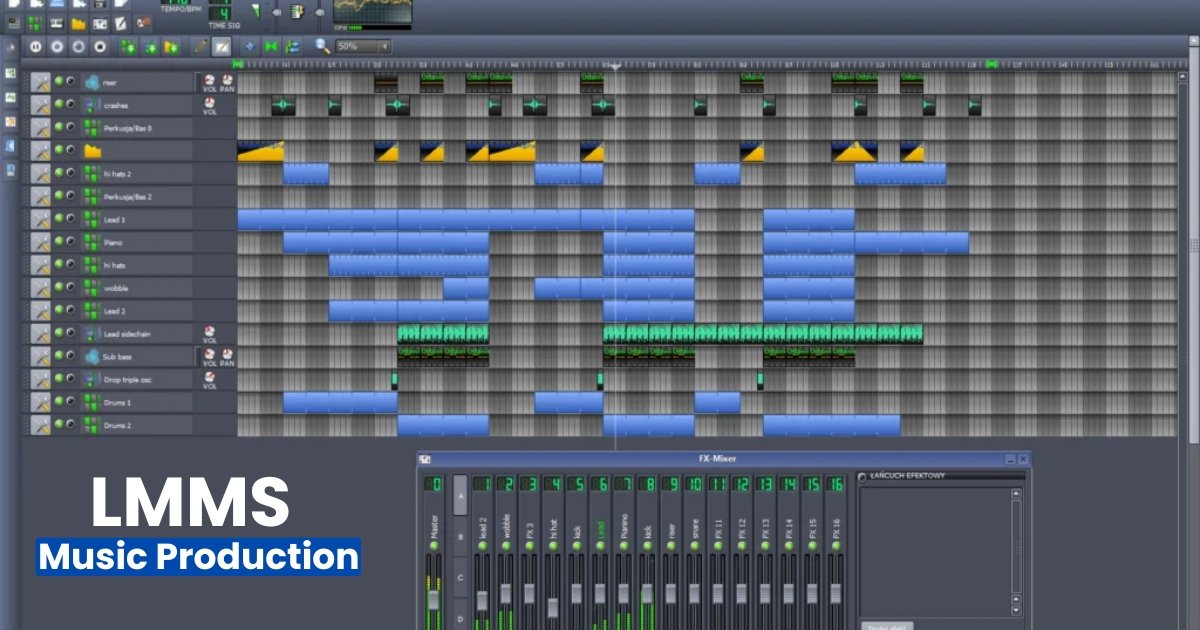
- It includes a song editor for arranging patterns and music compositions.
- The software comes with built-in instruments, synths, and audio effects.
- LMMS supports MIDI keyboards, VST plugins, and sample-based music production.
Pros and Cons
- Pros: Free and open-source with active community support for learners.
- Pros: Great for beat making, electronic music, and MIDI sequencing.
- Cons: The Interface feels outdated compared to modern digital audio workstations.
- Cons: Lacks advanced recording options for professional audio editing needs.
Best For
Best for beginners exploring free music production software with no cost barrier. Ideal for hobbyists creating beats, loops, and electronic music projects. Suitable for learners experimenting with open-source DAW tools.
5. Audacity (Cross-Platform)
Key Features
- Audacity offers multitrack recording and simple audio editing tools for beginners.
- It supports WAV, MP3, and other standard export formats for sharing.
- Built-in noise reduction and audio effects improve recording clarity quickly.
- Audacity supports plugins and basic multitrack editing through simple interfaces.
- Search intent: informational, users want precise details about free audio editing software.
Pros and Cons
- Pros: Completely free audio editor, open-source, and easy to install.
- Pros: Simple tools let beginners trim, normalize, and fix noisy recordings.
- Cons: Not ideal for complete music production and advanced MIDI workflows.
- Cons: The Interface looks dated and lacks some modern music production tools.
Best For
Best for podcasters and voice editors who need simple audio editing tools. Excellent choice for learners, trimming vocals, creating samples, and cleaning audio. Not recommended as a primary DAW for composing complex MIDI arrangements professionally.
6. BandLab (Online DAW)
Key Features
- BandLab is a browser-based online DAW offering multitrack recording and editing.
- It stores projects in the cloud for easy access and collaboration.
- BandLab includes loops, virtual instruments, and built-in mixing tools for free.
- It supports MIDI input and basic automation for dynamic music arrangements.
- BandLab offers mobile apps so you can record on phones or tablets.
Pros and Cons
- Pros: Free to use with unlimited cloud storage for your music projects.
- Pros: Easy collaboration tools let multiple users edit tracks together in real-time.
- Cons: Internet connection is required for full functionality, limiting offline work.
- Cons: Advanced plugins and VST support remain limited compared to desktop DAWs.
Best For
Best for beginners who want simple, cloud-based music production without installs. Best for remote collaborators, educators, and mobile creators making quick demos. It is not ideal for professional mixing workflows requiring VSTs and high-end audio routing.
7. Soundtrap by Spotify (Online DAW)
Key Features
- Soundtrap runs in your browser and supports recording and online collaboration.
- It provides virtual instruments, loops, and easy music editing tools for beginners.
- Soundtrap uses cloud-based storage to keep projects safe and accessible.
- It supports MIDI input and recording with simple virtual instruments for composition.
- Built-in pitch correction tools simplify vocal tuning for quick podcast editing jobs.
- Mobile apps let creators record on phones and tablets when traveling.
Pros and Cons
- Pros: Easy collaboration features let friends work together on music projects in real-time.
- Pros: Intuitive interface reduces learning time for new music production software users.
- Pros: Integrated loops and samples speed up beat-making and creativity sessions.
- Cons: Requires stable internet for full features, limiting offline music production options.
- Cons: Advanced plugin support remains limited compared with desktop digital audio workstations.
- Cons: Subscription tiers lock some content, adding costs for premium sound packs.
Best For
Best for beginners wanting easy, cloud-based collaboration and fast project sharing. Great for teachers, students, and remote bands creating demos and practicing together. Not ideal for studios requiring deep VST routing and professional mixing capabilities.
Comparison Table of Free Music Production Software
| Software | Platform | Best For | Key Features | Pros | Cons |
| GarageBand | macOS, iOS | Beginners making music on Apple devices | Multi-track recording, loops, and MIDI support | User-friendly, free, good sound library | Only for Apple devices |
| Cakewalk by BandLab | Windows | Intermediate users needing a full DAW | Unlimited tracks, VST3 support, mastering tools | Professional features, free | Windows-only, can overwhelm beginners |
| Tracktion Waveform Free | Win, macOS, Linux | Cross-platform creators | Unlimited tracks, VST support, advanced editing | Flexible, modern interface | Limited free plugins, learning curve |
| LMMS | Win, macOS, Linux | Hobbyists and learners | Song editor, MIDI, VST, built-in instruments | Free, open-source, strong community | Outdated interface, limited recording |
| Audacity | Cross-Platform | Podcasters, voice editors | Multi-track recording, noise reduction, effects | Free, lightweight, easy to use | Lacks MIDI and advanced DAW features |
| BandLab (Online DAW) | Browser, Mobile Apps | Beginners, remote collaboration | Cloud storage, MIDI input, mixing tools | Free, collaborative, mobile support | Needs internet, limited plugin support |
| Soundtrap by Spotify | Browser, Mobile Apps | Beginners, teachers, and remote bands | Loops, virtual instruments, and vocal tuning | Collaboration, simple interface | Subscription for extras, limited plugins |
How to Choose the Right Free Music Production Software
Choosing the right free music production software depends on your needs and setup. First, check your operating system because some DAWs only run on Windows, macOS, or Linux. Next, define your main goal: recording, beat making, MIDI composing, or simple audio editing.
Always review plugin support, such as VST or AU, for adding instruments and audio effects. Look at the workflow style, clip-based, linear arrangement, or pattern editors, and pick what feels natural. Make sure your computer meets system requirements to avoid crashes and latency issues. Built-in sounds, loops, and sample packs can help speed up your creativity.
The interface should be clean and easy so beginners can learn quickly. Also, confirm export formats like WAV or MP3 to share tracks easily. Reading tutorials and community reviews ensures you get support and resources for learning. Start with a free DAW for practice, then upgrade to paid music production software as your skills grow.
Consider a cloud-based online DAW that supports collaboration and remote projects if mobile access matters. Always balance advanced features with simplicity to build a stress-free home studio setup.
Step-by-Step Setup Guide for Beginners
- Download and install your chosen DAW from the official website or store.
- Create a new project and set the project sample rate and tempo.
- Connect your audio interface to the computer via USB or Thunderbolt port.
- Install the correct audio driver or select the built-in ASIO driver.
- Open audio settings and choose your interface as the input and output.
- Set a low buffer size for recording, raise it for mixing heavy sessions.
- Create an audio track, arm it, then test levels with a short recording.
- Connect a MIDI keyboard if needed and configure MIDI inputs in settings.
- Use headphones or monitors for proper monitoring to avoid feedback and echo.
- Record short takes, combine the best parts, then trim using audio editing tools.
- Add simple EQ and compression while learning basic mixing techniques gradually.
- Export your track as WAV or MP3 with the correct bit depth and sample rate.
- Back up projects in the cloud or an external drive to protect your work.
Exporting and Sharing Your Music
Finish the mixing and basic mastering steps when your track is ready. Open the export settings in your chosen DAW and select the whole timeline. Pick a format like WAV for high quality or MP3 for easy sharing. Adjust the bit rate and sample rate for smooth playback across different devices.
Save the file in a dedicated music production folder with a clear project name. After exporting, listen carefully to check for noise, clipping, or unwanted issues. Share your music on SoundCloud, BandLab, or Spotify for streaming and exposure. You can also send the MP3 file through email or messaging apps.
Use social media platforms to reach listeners and grow your audience quickly. Always back up tracks with cloud storage or an external drive for safety. Keep the original project files stored securely in case you want future remixes.
Common Issues and Fixes in Free DAWs
Many beginners face problems when using free DAWs for music production at home. Crashing is common, but updating the software usually fixes stability issues quickly. High CPU usage slows projects, so freeze heavy tracks or reduce plugin counts. Audio delays occur frequently, but adjusting the buffer size in audio settings helps reduce latency.
Check your audio interface and ensure correct inputs and outputs if sound fails. MIDI controllers sometimes stop working, but re-selecting them in device settings solves the issue. Background noise is another problem, but using noise reduction tools or EQ filters removes it.
Projects may lag, so disable unused tracks and close unnecessary applications for smoother performance. Exporting errors happen, too, but re-checking file formats and sample rates usually resolves them. Missing VST plugins create trouble, but reinstalling instruments and effects restores your workflow. Installation problems occur on Windows, but running the DAW installer as an administrator fixes them.
FAQs About Free Music Production Software
What is free music production software?
Free music production software is a tool for creating, recording, and editing songs. These programs include DAWs with features like audio editing, MIDI sequencing, and virtual instruments. Beginners and hobbyists often use them for learning and building home studio projects.
Is free music production software suitable for beginners?
Yes, free DAWs are excellent for beginners learning music production basics. They provide essential tools like recording, mixing, and arranging tracks. Many options include built-in instruments, loops, and effects. Free software helps learners practice without investing money in professional tools.
Can I make professional music with free DAWs?
Yes, many artists use free DAWs to produce professional-quality songs and beats. Free tools include audio editing, virtual instruments, and effect plugins. With consistent practice and creativity, you can release music. Sharing finished tracks on SoundCloud or Spotify is possible.
What are the best free DAWs right now?
Popular free music production software includes GarageBand, Cakewalk, LMMS, Audacity, and BandLab. These options support audio recording, MIDI, and editing features. Each program fits different workflows. Choose one based on your device, style, and music production needs for beginners.
Do free DAWs support VST plugins?
Yes, most free DAWs support VST plugins for instruments and audio effects. You can install virtual synthesizers, drum kits, and reverb effects. These plugins expand creativity. They help improve your music production workflow without needing paid software upgrades or purchases.
Conclusion
Free music production software makes it simple for beginners to start creating songs. Every DAW has unique features, so pick one that fits your workflow best. Learn basic recording and audio editing tools before exploring advanced plugins or sample packs. Regular practice builds strong music production skills and boosts your creativity over time.
Share your finished tracks on SoundCloud, Spotify, or YouTube to grow your audience. Always organize your project files and keep backups to prevent losing important work. The best free DAW is the one that feels comfortable and inspires you.